
Cartoonize Photo Free: Ultimate Guide to Best Tools to Cartoonize Your Photo Online (2025)
Updated: Sep 20, 2025 • Read time: ~7 min • Category: Photo Editing
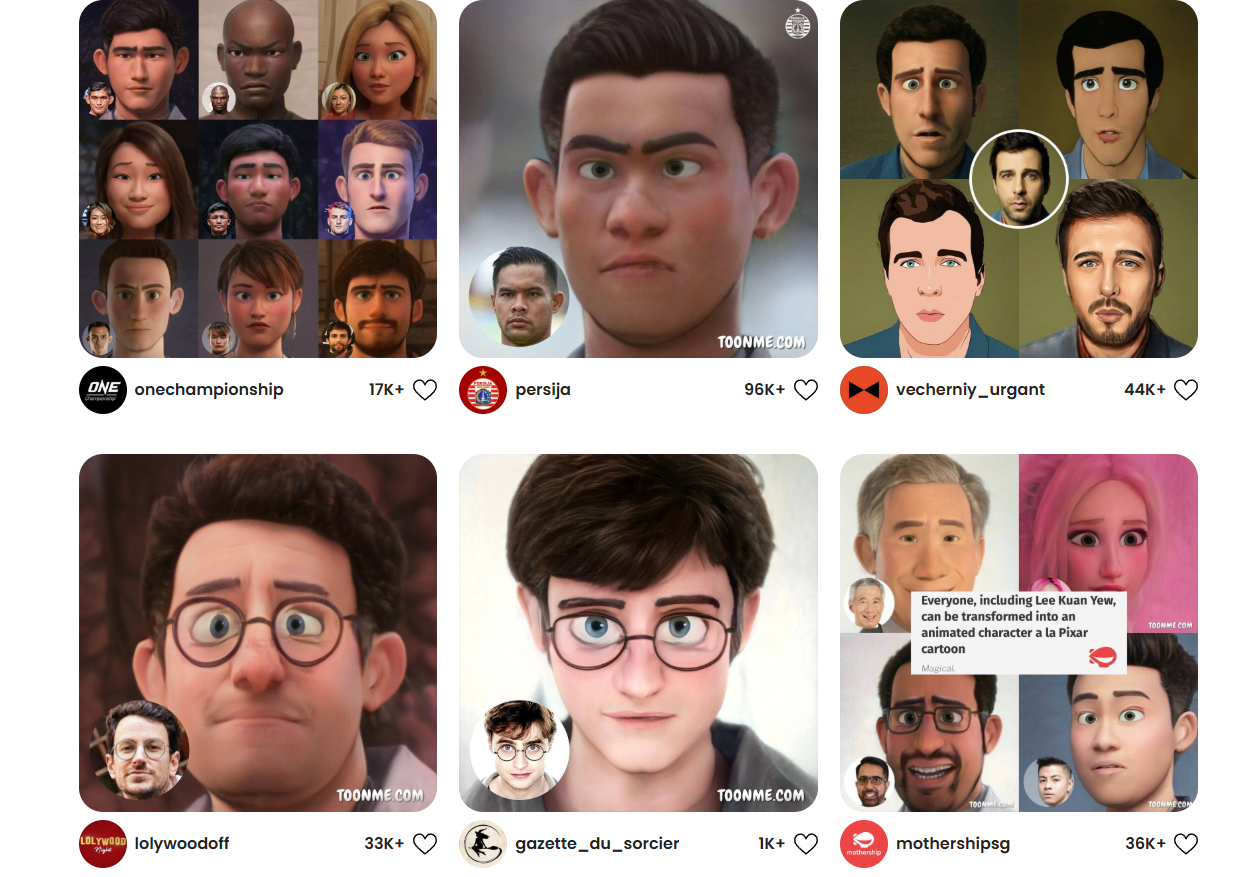
Cartoonize photo free using this ultimate guide for 2025. Cartoon-style photos are trending worldwide because they make ordinary images look unique, fun, and professional. Whether you are a student, a social media influencer, or a business owner, cartoonizing your profile pictures can grab attention instantly. With apps like ToonMe, PicsArt, Fotor, Cartoonize.net, and PhotoCartoon.net, you can quickly transform your photos into colorful and creative cartoons without spending a dime.
In 2025, AI photo editing has become incredibly advanced. The best part? Most of these tools let you cartoonize photo free without downloading heavy software. These online platforms are fast, easy to use, and work on any device, including phones, tablets, and laptops.
Why Cartoonize Photo Free?
Cartoon images are not just entertaining — they are excellent for profile pictures, social media posts, brand identity, YouTube thumbnails, and marketing campaigns. Choosing to cartoonize photo free lets you stand out on Instagram, WhatsApp, and Facebook with bright, eye-catching results.
Benefits of Cartoonizing Photos
- Privacy Protection: Cartoon images hide your real face but still look cool.
- Creative Branding: Perfect for YouTubers, streamers, and small businesses to create unique avatars.
- Fun & Engaging: Great for sharing with friends or making fun profile pictures.
- Gift Ideas: Turn photos into cartoon portraits as a memorable gift.
- Content Marketing: Cartoon-style images get more clicks and shares, improving engagement.
Top Cartoonize Photo Free Tools
1. ToonMe — Best Pick
How to Use: Upload your photo, choose a cartoon style, and download the result in seconds.
- ToonMe Official Website
- AI-powered cartoon filters
- Pre-made templates and art styles
- Available on Android, iOS, and Web
2. PicsArt — Editing + Cartoonizing
How to Use: Open PicsArt, select Effects → Artistic → Cartoon, apply your favorite style, and save.
- PicsArt Official Site
- Photo and video cartoon filters
- Background eraser, collage maker, and advanced editing
3. Cartoonize.net — No App Needed
How to Use: Go to Cartoonize.net, upload your image, pick a style, and download it instantly.
4. Fotor — AI Cartoon Generator
How to Use: Visit Fotor, click “AI Tools → Cartoonize,” choose your preferred effect, and save.
5. PhotoCartoon.net — Simple & Fast
How to Use: Go to PhotoCartoon.net, upload your picture and get a quick cartoon result.
Bonus: Prisma
Prisma uses AI to turn photos into art, including cartoon-like effects. Check out Prisma’s official site for unique filters.
Tips for Best Cartoonize Photo Free Results
- Use high-resolution images
- Good lighting improves AI results
- Experiment with different cartoon styles
- Adjust brightness/contrast after cartoonizing
- Crop images for Instagram (1:1 ratio)
- Download in HD to keep image quality
- Try mixing two tools for a unique hybrid effect
FAQ about Cartoonize Photo Free
- How can I cartoonize my photo free? Use ToonMe, PicsArt, or Fotor.
- Which app is best? ToonMe is simple and fast; PicsArt is great for editing extras.
- Is it safe? Yes, but avoid sharing sensitive images.
- Do I need to pay? Free versions work fine, premium gives more styles.
- Can I use these for YouTube? Absolutely, cartoon avatars are great for channel branding.
Conclusion & Thanks
Using these cartoonize photo free tools is the easiest way to make your pictures fun, creative, and social-media ready. Try ToonMe, PicsArt, Fotor, Cartoonize.net, or PhotoCartoon.net today and give your profile pictures a completely new look. Share your results on Instagram or Facebook to inspire others and drive engagement.
Thank You for Reading!
If this guide helped you, share it with friends and bookmark this page. Pro tip: Combine multiple tools for unique cartoon effects and create your signature style.